Data retention and cleanup
Use Data Management in your project settings to control how long Flowize keeps data records, webhook responses, and processed batch files. You can also request deletion of eligible records or webhook responses for a specific date range.
Open Data Management
- Open your project.
- Select Settings under Manage.
- Select Data Management from the settings menu.
Data Management is shown when your account has access to delete project data. Saving retention changes also requires access to save project settings. See Roles and restrictions for general project access information.
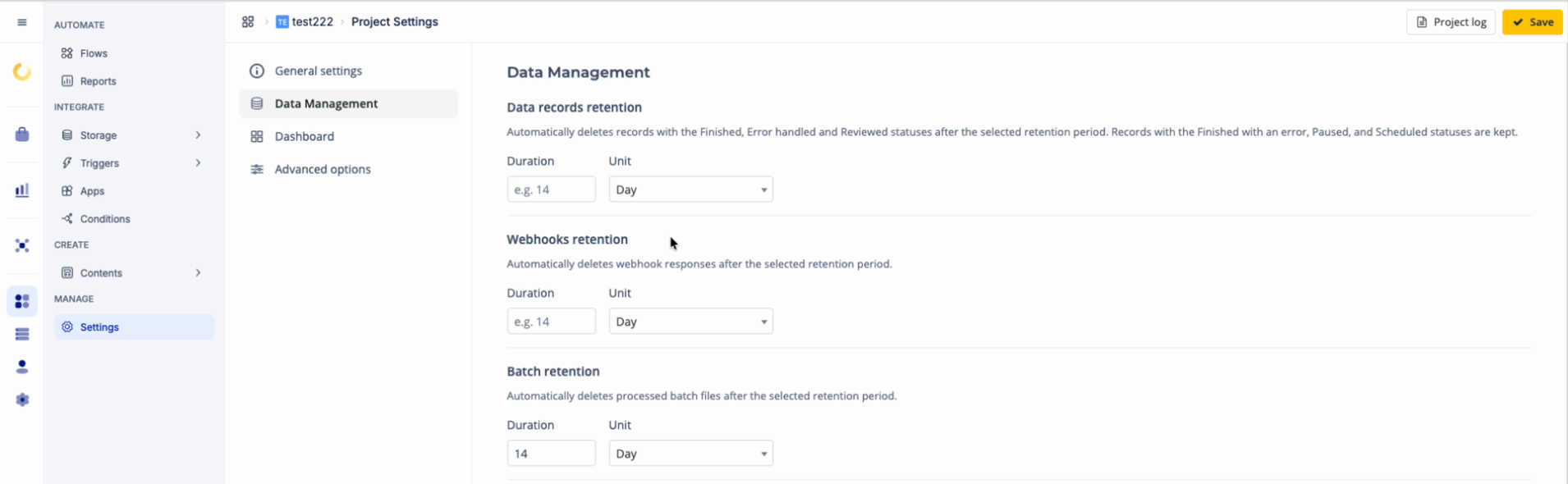
Configure automatic retention
Each retention section has its own Duration and Unit. The available units are Day, Month, and Year.
- Enter a duration in each section you want to configure.
- Select its unit. For example, a duration of
14with Day sets a retention period of 14 days. - Select Save in the upper-right corner.
Use a whole-number duration to enable retention. For Data records retention and Webhooks retention, leaving Duration empty or entering 0 disables automatic retention for that category. Batch retention always requires a positive duration; an empty value or 0 prevents the settings from being saved.
Automatic deletion runs during background cleanup. Saving a retention setting does not run the cleanup immediately.
Data records retention
Data records retention applies to records with Finished, Error handled, or Reviewed status. The retention period is measured from the record's last run date.
| Record status | Included in retention cleanup |
|---|---|
| Finished | Yes |
| Error handled | Yes |
| Reviewed | Yes |
| Finished with an error | No |
| Paused | No |
| Scheduled | No |
Disabling automatic retention stops age-based cleanup for this category. Records already marked for deletion can still be removed during background cleanup.
Deleting a record also removes its associated execution steps and analytics. Use Reports to inspect records before requesting deletion.
Webhooks retention
Webhooks retention deletes webhook responses after the selected period, measured from each response's creation date.
This setting applies to stored responses. For information about receiving and using them in flows, see Webhooks.
Batch retention
Batch retention deletes batch files and batch entries with Finished or Finished with errors status after the selected period. The period is measured from the batch's finish date. If a batch in one of these statuses has no finish date, cleanup uses its last update date.
Batch retention does not delete the data records created by the batch. Those records follow Data records retention. See Batches for batch processing and status information.
Delete data for a specific date range
Under Delete specific data, select records, webhook responses, or both. Each option has its own date range:
- Delete My Data reports selects data records with Finished, Error handled, or Reviewed status. Records with other statuses are excluded.
- Delete Webhook responses selects webhook responses.
Both options use the item's creation date. This differs from automatic record retention, which uses the last run date. The selected range includes the whole From day and the whole To day.
- Turn on Delete My Data reports, Delete Webhook responses, or both.
- For every enabled option, use the date pickers to fill in From and To.
- Select Delete.
- Confirm deletion.
Deletion is permanent and cannot be undone. Check the selected categories and date ranges before confirming.
The success message shows counts for My Data and Webhook Responses. Data records are marked for removal during background cleanup; the My Data count does not mean removal has already finished. Webhook responses are deleted during the request.
Select Delete to request deletion for the chosen date ranges. To apply changes to the retention settings, select Save.
Validation and limitations
- Delete is disabled until at least one deletion option is enabled.
- Both dates are required for each enabled option. A category with either date missing is skipped. If the other category has both dates, it can still be processed.
- If a request contains no selected deletion category, Flowize reports No data to delete.
- Delete specific data has no date-range option for batch files. Configure Batch retention for automatic batch cleanup.
- Automatic record retention and date-range record deletion both preserve records outside the Finished, Error handled, and Reviewed statuses.
Was this article helpful?